Pay once · No subscription

The file transfer client macOS always deserved.

FTP, FTPS and SFTP in one native app. The power of a pro client, the elegance of Apple. Built in Swift & SwiftNIO for rock-solid, blazing-fast transfers.

  • Free to download, full core features
  • Keychain & App Sandbox secure
  • Native for macOS 15 Sequoia
Speaks every protocol
FTP FTPS SFTP Swift & SwiftNIO Keychain App Sandbox
3protocols in one app
0subscriptions, ever
100%native Swift & SwiftNIO
saved sites, even free
Connectivity

Every protocol, done properly

One app for plain FTP, encrypted FTPS and SFTP over SSH — with the authentication your servers actually use, from passwords to private keys.

FTP

Classic FTP

Active and passive mode, UTF-8 paths and robust listing parsing (Unix & Windows servers). Perfect for legacy hosting and intranet boxes.

FTPS

FTPS over TLS

Explicit (AUTH TLS) and implicit FTPS with full certificate validation. When a certificate is self-signed, you review the fingerprint and decide — no blind trust.

SFTP

SFTP over SSH

Full SFTP with password or, in FULL, RSA and ed25519 private keys with passphrases. Host identity is pinned with a known-hosts store to stop MITM.

Passwords are stored in the macOS Keychain. Private keys never leave your Mac. Host fingerprints are verified on every connection.

Built for power users

Everything a pro client needs, none of the clutter

A real dual-pane workflow with a professional transfer engine — wrapped in an interface that feels right at home on your Mac.

Dual-Pane

Local and remote, side by side

Browse your disk and your server in a clean two-panel view with native icons, breadcrumbs, instant filtering, list and grid modes. Drag & drop from Finder or between panes.
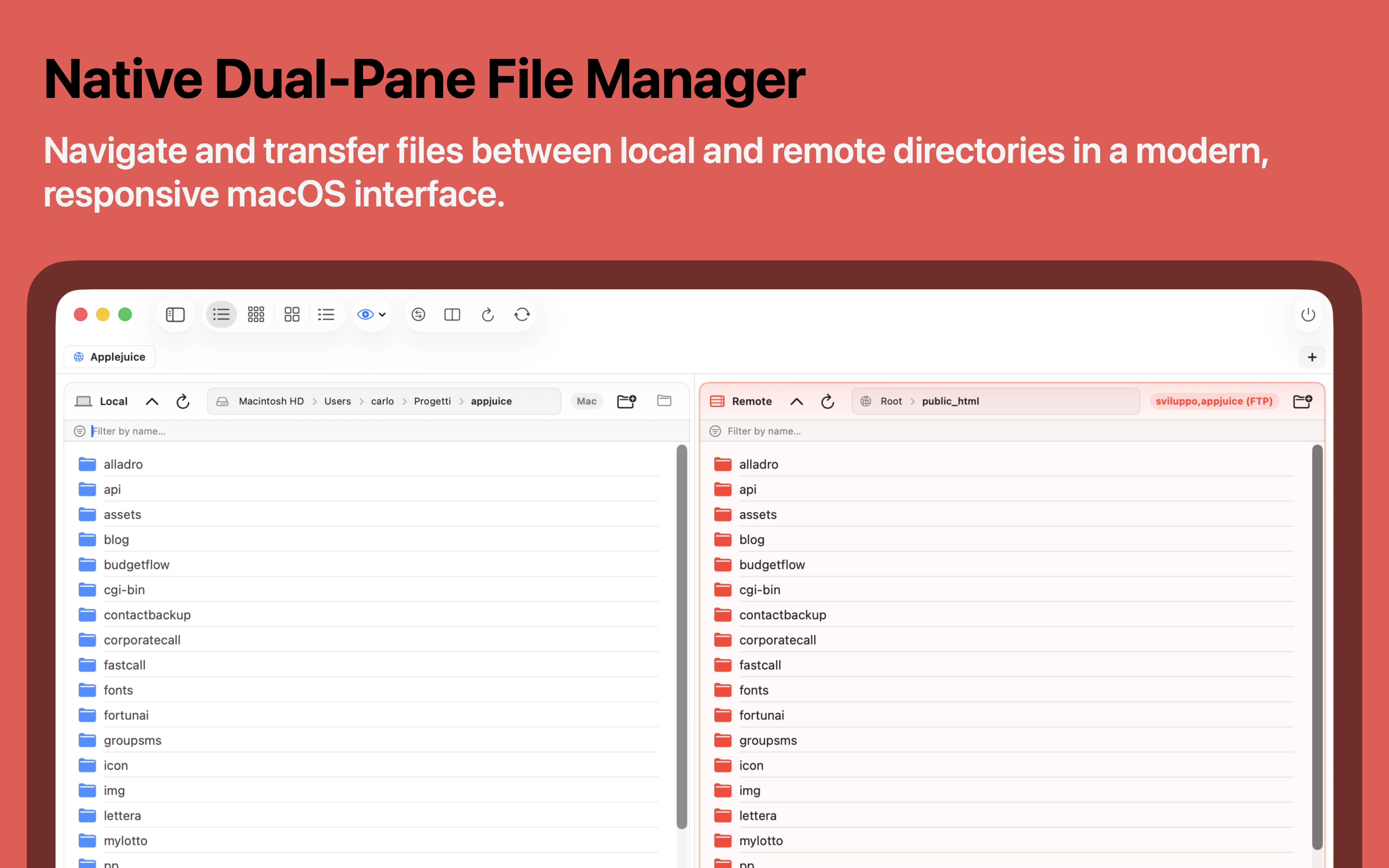
  • Interactive breadcrumb address bar
  • List, small & large icons, detail columns
  • Drag & drop with Finder and across panes
Upstream dual-pane file manager
Transfer engine

A queue that never gives up

Multi-threaded, recursive transfers for files and whole folders. Interrupted? Upstream resumes automatically with exponential-backoff retries and live speed, all on SwiftNIO.
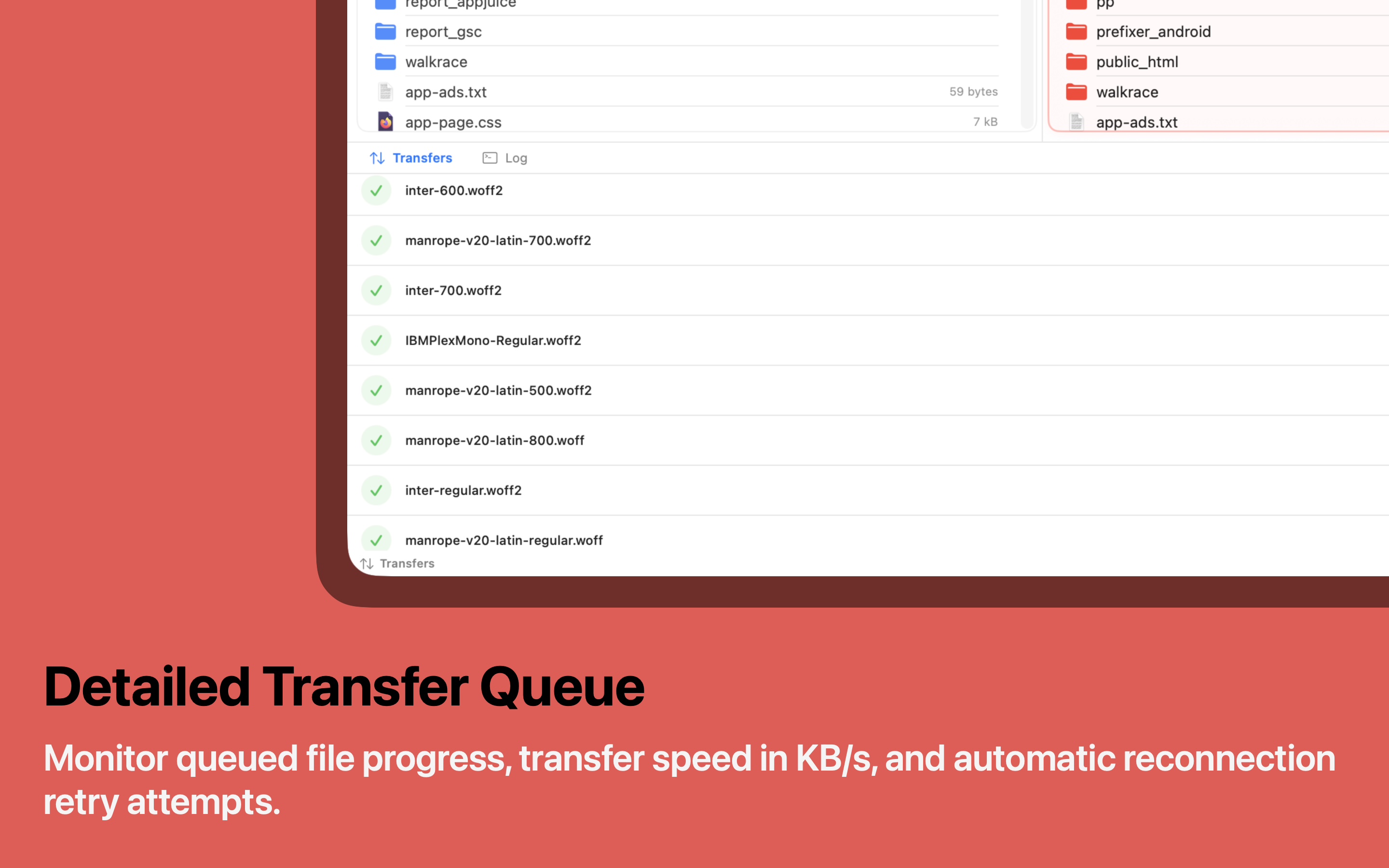
  • Concurrent queue, configurable parallelism
  • Automatic resume of interrupted transfers
  • Live protocol log in a terminal-style console
Upstream transfer queue
FULL

Edit remote files like they're local

Open any remote file in VS Code, TextMate or Xcode. Upstream watches for saves and re-uploads to the server instantly — your edit loop without the manual round-trip.
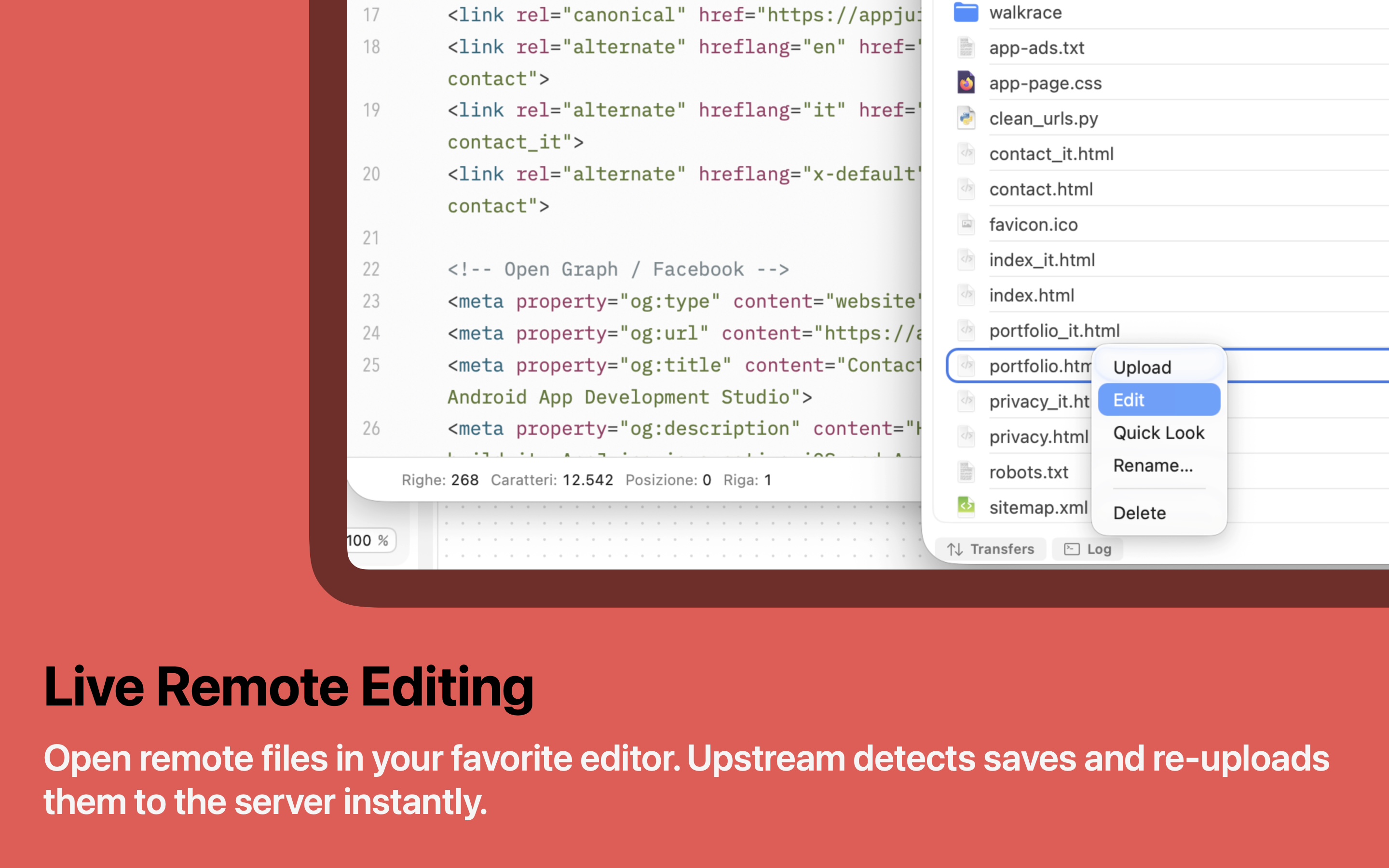
  • Watch mode auto-uploads on save
  • Pick your editor from the app catalog
  • One-shot remote edit is free, too
Upstream live remote editing
FULL

Sync folders with total confidence

Compare local and remote directories and mirror them in either direction. A dry-run preview shows exactly what will upload, download or delete before anything happens — with .syncignore exclusions and smart conflict handling.

  • Dry-run preview before every sync
  • Color-coded diff: missing, changed, newer
  • Synchronized browsing across both panes
Upstream folder synchronization
FULL

Fly between servers with ⌘K

Hit ⌘K, type a few letters, and connect to any saved site or run an action instantly. Fuzzy matching finds what you mean — keep your hands on the keyboard and your flow unbroken.

  • Fuzzy command palette for sites & actions
  • Multiple tabs, one server per session
  • Quick Connect for one-off servers
Upstream command palette
More inside

Packed with thoughtful details

Dozens of small decisions that add up to a client you actually enjoy using.

Keychain security

Every credential is stored in the macOS Keychain. Nothing ever leaves your Mac in the clear.

Quick Look

Preview remote files instantly with the spacebar — no download, no detour.

CHMOD editor

Set permissions with an interactive rwx grid or by typing the octal value directly.

Live console log

Watch raw protocol commands and responses stream by in a modern terminal-style panel.

Remote file management

Create, rename, move and delete files and folders on the server as if they were local.

Instant search & filters

Filter any listing as you type to find the one file among thousands in a heartbeat.

Import from FileZilla FULL

Migrate every server in seconds from sitemanager.xml or your ~/.ssh/config.

SSH key auth FULL

Connect over SFTP with RSA or ed25519 private keys and passphrases.

Multiple tabs FULL

Stay connected to several servers at once and switch sessions in a click.

Download as ZIP FULL

Grab several remote files or whole folders as a single ZIP generated on the fly.

Bandwidth limit FULL

Cap the global transfer speed so a big upload never hogs your whole connection.

iCloud sync FULL

Keep your saved sites and bookmarks in sync across all your Macs.

Trust by design

Security that isn't an afterthought

Upstream runs inside Apple's App Sandbox and treats your servers and credentials the way a native Mac app should.

App Sandbox & Keychain

The app is fully sandboxed per Apple's guidelines, and every password lives in the system Keychain — never in a plist, never in the clear.

Certificate & host verification

FTPS certificates are validated, and SFTP host keys are pinned in a known-hosts store. If a fingerprint changes, Upstream stops and asks — protecting you from man-in-the-middle attacks.

No accounts, no tracking

There's no Upstream login and no analytics harvesting your activity. Your sites, keys and files are yours — the app just connects you to your servers.

Private SSH keys stay put

RSA and ed25519 keys are read locally and used only to authenticate. They're never uploaded, copied or shared with anyone — including us.

Who it's for

One client, every workflow

From shipping a website to backing up a NAS, Upstream fits the way you already work.

Web developers

Deploy a WordPress theme or a static site, edit remote files live in VS Code, and sync a build folder in one pass — dry-run first, of course.

Sysadmins & NAS owners

Move files to a Synology or QNAP over SFTP, fix permissions with the CHMOD editor and keep an eye on the protocol log while you work.

Homelab & Raspberry Pi

Connect to a VPS, a seedbox or a Raspberry Pi with SSH keys, and manage everything from a real Mac interface instead of the terminal.

Agencies & freelancers

Keep dozens of client servers in a color-coded Site Manager, jump between them with tabs and ⌘K, and sync them all across your Macs with iCloud.

Switching over?

Bring every server with you in seconds

Coming from another client? Upstream FULL imports your whole server list so you don't retype a single host, port or username.

1

Export your sites from FileZilla, or point Upstream at your ~/.ssh/config.

2

Import sitemanager.xml — every host, port and protocol comes across intact.

3

Add passwords to the Keychain or attach an SSH key, and you're connected.

Free vs Full

Powerful for free. Unstoppable with FULL.

Core transferring is always free and never limited. FULL adds automation for your daily workflow — a single purchase, yours forever.

Feature Free FULL
Pricing

Buy once. Use forever.

No subscriptions, no accounts, no nonsense.

Upstream

Free

Everything you need to transfer files every day.

  • Unlimited FTP, FTPS & SFTP sites
  • Concurrent & recursive queue with resume
  • Site Manager with Keychain
  • Quick Look, CHMOD, console log & filters
Download free

In-app purchase. Family Sharing supported. Restore on any of your Macs.

FAQ

Good questions, clear answers

We're listening

Support & feedback

Found a bug, have an idea, or need a hand? Send it straight to the team.

Your message goes to the Upstream team at AppJuice. We only use it to reply.